


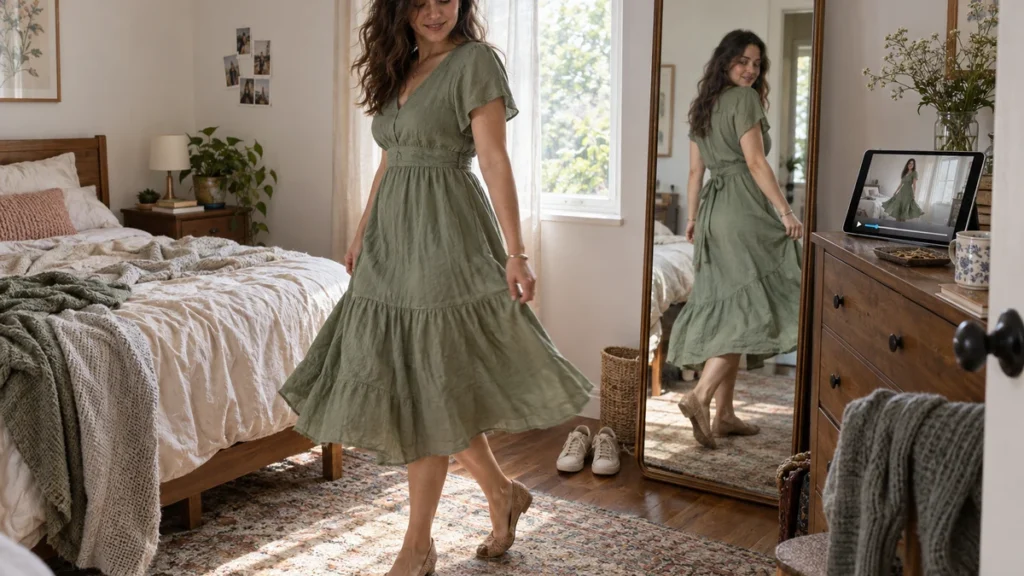
Yes. TryFits AI offers video try-ons, so you can preview an outfit in motion rather than judge it only from a still image. Its digital twin starts with a full-length photo, or a selfie plus measurements. The resulting video is an AI-generated visual preview, not footage of you physically wearing the garment.
That makes it useful for a specific shopping problem: a dress looks appealing in a product photograph, but you cannot picture the whole outfit beyond that single pose. You want to see whether the skirt dominates the look, whether the jacket feels too formal, or whether a bold print still appeals when the image moves.
If your question is “can virtual try on show clothes in motion,” separate appearance from physical performance. A moving preview can help you assess the outfit visually. It cannot establish whether a skirt restricts your stride, a neckline stays secure, or a fabric feels comfortable during dinner.
What TryFits AI video try-ons can show
The supplied TryFits AI FAQ and App Store information describe digital-twin previews, video try-ons and styling suggestions. You can choose clothes in the app, paste a product link, upload a garment photo, or describe an outfit for the AI to create. Those options let you explore a particular item or develop an outfit idea.
For a buying decision, start with the actual garment rather than a description of something similar. A photograph of a navy pleated dress gives the preview a specific reference; “navy dress for dinner” asks the AI to create an interpretation. The second approach is useful for inspiration, but it does not establish how a particular retailer’s dress will look.
Watch the video for the overall impression: how much visual space the garment occupies, where the strongest color sits, and whether the silhouette matches your taste. You might prefer a narrow skirt with a roomy jacket, or discover that an all-over floral feels busier than expected. Treat apparent fabric movement as generated imagery, not a tested property of the material.
Set up a comparison that answers one question
Begin with a clear reference photo. Even daylight, a visible outline and an uncluttered background make your starting image easier to assess. Avoid a dramatically tilted camera or a pose that hides much of your torso. These are practical photography choices, not a promise of a particular result.
Choose one decision before generating alternatives. For example: “Do I prefer a pleated midi dress or a straight midi dress for this dinner?” Keep the color family and intended occasion similar. Comparing a silver sequined mini with a brown knitted maxi introduces too many differences to tell which feature you actually prefer.
If your choice involves a store item, use its product link or garment image as the reference. Our guide to trying on clothes from a product link explains that input route. Keep the retailer’s original photographs available so you can check that the generated version retains the defining details.
Review the still preview first, then the video. Look for changes to the neckline, hem, print or closures between the source and the result. If a straight skirt becomes flared, or a small floral becomes oversized, do not base your purchase on that altered feature. Return to the original listing for the garment’s construction.
Three outfit decisions worth previewing in motion
A pleated midi dress for an autumn dinner
Try a forest-green pleated midi with a short charcoal cardigan as one option, and a straight navy crepe midi as another. The pleated version puts more visual activity below the waist; the straight dress gives a quieter outline. A moving preview can help you decide which overall effect you prefer without treating either silhouette as a rule for your body.
For a cool evening, consider opaque tights and closed shoes rather than styling the dress only for a warm restaurant. Check the fabric composition and lining separately: fine polyester pleats and heavier wool-blend pleats are different purchases. If you dislike the volume in the preview, a skirt with fewer pleats offers an alternative without abandoning the midi length.
A printed skirt for a daytime event
Compare a cream skirt with small burgundy flowers against one with a larger botanical print, both with a plain burgundy knit. In the video, ask whether you still enjoy the print when it is no longer presented as a static product photograph. Keep the top simple so you are assessing the pattern rather than competing outfit details.
For mild weather, a cotton skirt with lining is a practical starting point. In colder conditions, consider a heavier woven fabric and boots, while checking the actual skirt opening and length. If both prints feel too prominent, try a textured solid fabric instead. The preview helps you choose the visual direction; the listing supplies the material facts.
A fluid blouse with tailored trousers
Preview an ivory blouse with charcoal straight-leg trousers, then consider a version with fuller sleeves. Focus on whether the sleeve volume is the feature you want people to notice. A restrained neckline and plain trousers give it room, while a crisp cotton-poplin shirt is an alternative if you prefer a more defined outline.
For a chilly commute, plan an outer layer that can accommodate the real sleeves. Video cannot tell you whether cuffs bunch inside a coat or whether silky fabric clings after walking. Check sleeve measurements where available, and physically test the blouse with your coat once it arrives.
What a moving preview cannot verify
A convincing video does not measure wearing comfort. It cannot confirm stretch recovery, seam strength, transparency under bright light or friction against tights. Nor should an apparent walking motion be treated as evidence that the actual garment permits the same movement. Keep these checks on your shopping list.
For a narrow skirt, look for a vent or slit and check its dimensions. For a fitted dress, compare your measurements with the retailer’s size chart and read whether the fabric contains stretch. For a blouse, inspect fastening placement and care instructions. Reviews can offer useful clues, but another shopper’s experience does not guarantee yours.
When the garment arrives, sit down, walk normally and reach forward while wearing it. Try the intended underwear, shoes and outer layer too. Keep tags attached and follow the retailer’s return conditions during assessment. Those physical checks answer the comfort and movement questions that the generated preview leaves open.
Common questions
Does TryFits AI offer video try-ons?
Yes. The supplied product information describes video try-ons alongside digital-twin outfit previews and styling suggestions. Use video to explore an outfit’s visual appearance, not as proof that the real garment will move identically.
Can a virtual try-on video tell me whether a dress is comfortable?
No. Generated movement cannot establish pressure, breathability or freedom of movement. Check the fabric, lining and size chart before ordering, then test sitting and walking in the actual dress within the retailer’s return conditions.
Should I use a garment photo or describe an outfit?
Use the actual garment photo or product link when considering a specific purchase. Describe an outfit when exploring ideas, such as a burgundy blouse with grey trousers. Once you find a direction you like, assess real products and their measurements separately.